Features and behavior
The Pause step
GRIP-EMS includes a dedicated Pause step that holds the sequence without attempting a cast. In the editor a Pause is a number of empty keypresses, and that is the only kind there is, because the engine advances one step per keypress and nothing else.
The Pause step is most commonly needed for specs with strict GCD relationships between abilities, for example preventing Steady Shot from firing too close to a proc window in Marksmanship Hunter. If you find a spell clipping something it should not, a one-click pause before that step is usually the fix to try first.
As of v2.4.0, GRIP-EMS also has a dedicated Hold While Channeling setting, covered in full on the Settings page, which stops a mid-channel press from burning a step at all. It solves a related but different problem than the Pause step: Pause deliberately holds position for a set count or duration you choose, while Hold While Channeling reacts to an active channel and holds only for as long as that channel runs. Through v2.4.13 the setting only showed up for characters with an actual empowered spell in their spellbook, in practice meaning Evoker, even though the underlying hold has always worked on any channel. That was a UI gating bug, fixed in v2.4.14, so it is now the first thing to reach for on any channeled spell, not just an Evoker-specific tool.
Reset conditions
Reset conditions send the sequence back to step 1. GRIP-EMS supports five of them and they can be combined.

The reset conditions panel. These can be combined — most tank and DPS sequences run with Reset on combat enabled.
Reset modifiers are a separate setting from the five above. You pick a modifier, hold it while you press the sequence key, and the sequence goes back to step 1. Through v2.4.20 they did nothing at all, because the press cast nothing and the step did not move, and the same bug kept the timer reset from ever firing. Both work as of v2.4.21. The timer is now measured before the press instead of after it, so coming back from a long pause puts you on step 1 on the very first press, and a pause that ends while you are in combat is held until the fight is over, so your next press after that starts from step 1 wherever it lands.
Two things about how the modifiers behave are worth knowing before you turn one on. A modifier variant ignores the reset modifiers its own key holds down, so a Shift variant is not reset by Shift, and every other reset modifier still sends it back to step 1. The mouse buttons are stricter than the keys: a keybind press never counts as a click, and neither does clicking the sequence's macro, because the macro only ever sends a left click, so Right Click, Middle Click, Mouse Button 4 and Mouse Button 5 never reset a sequence through a keybind or the macro and only do it when a macro line of your own clicks the sequence with that mouse button. When you turn one on in the editor, the chat line shows the exact line to put in that macro. Left Click is the one that can still reset from the macro: clicking the macro with the left mouse button sends the sequence back to step 1, and so does a press through an action bar key, because the default action bars pass a key press to a macro as a left click, which means a macro on an action bar key resets on every press.
Step toggle keys
Added in v2.4.21 · /gems stepkey
A step can have its own key that turns it off and back on. Right-click the step in the editor, choose Set Toggle Key, and press the key you want. Out of combat, that key switches the step off or on at once and chat names the step and the sequence, and in combat it changes nothing and says so. Each character keeps its own step keys, and /gems stepkey sets, clears and lists them, which is also the way to reach them in Simplified Mode.
A key that is already bound to something is refused when you set it, and if you give that key to a sequence or to something in the game's key bindings later, that binding wins and chat tells you. Because it only works out of combat, it is a between-pulls control, for pulling a step out of the loop or putting it back without opening the editor.
Skyriding and mount behavior
Pressing your sequence keybind while skyriding behaves differently depending on whether you have an attackable target.
This requires Auto Dismount in Flight to be enabled in your WoW settings. Druids also need Auto Unshift enabled to exit skyriding Travel Form mid-air with the same single press.
Getting dazed off a skyriding mount mid-pull used to leave your sequence keys dead until you dropped combat. That is fixed. The swap to your ground action bar now happens the moment you land, combat-safe, so your keys are ready the instant you hit the ground.
There was a separate bug on first takeoff of a session where ground binds stayed live mid-air or vehicle keys never woke up at all. That is also fixed. The out-of-combat watchdog now heals the swap at takeoff and restores it on landing, so the first flight of every session behaves the same as every other.
Context switching and multi-version sequences
A single sequence in GRIP-EMS can hold more than one version, and the addon picks which one is live based on what content you are in. GRIP-EMS recognizes dozens of distinct context types across raid difficulty, dungeon difficulty, Mythic+ key ranges, delve tiers, rated PvP, and more, and it checks on zone change, difficulty change, and group roster update. If you have built a separate version of a sequence for, say, Mythic+ versus raid, walking into a dungeon swaps you to that version automatically with no manual intervention.
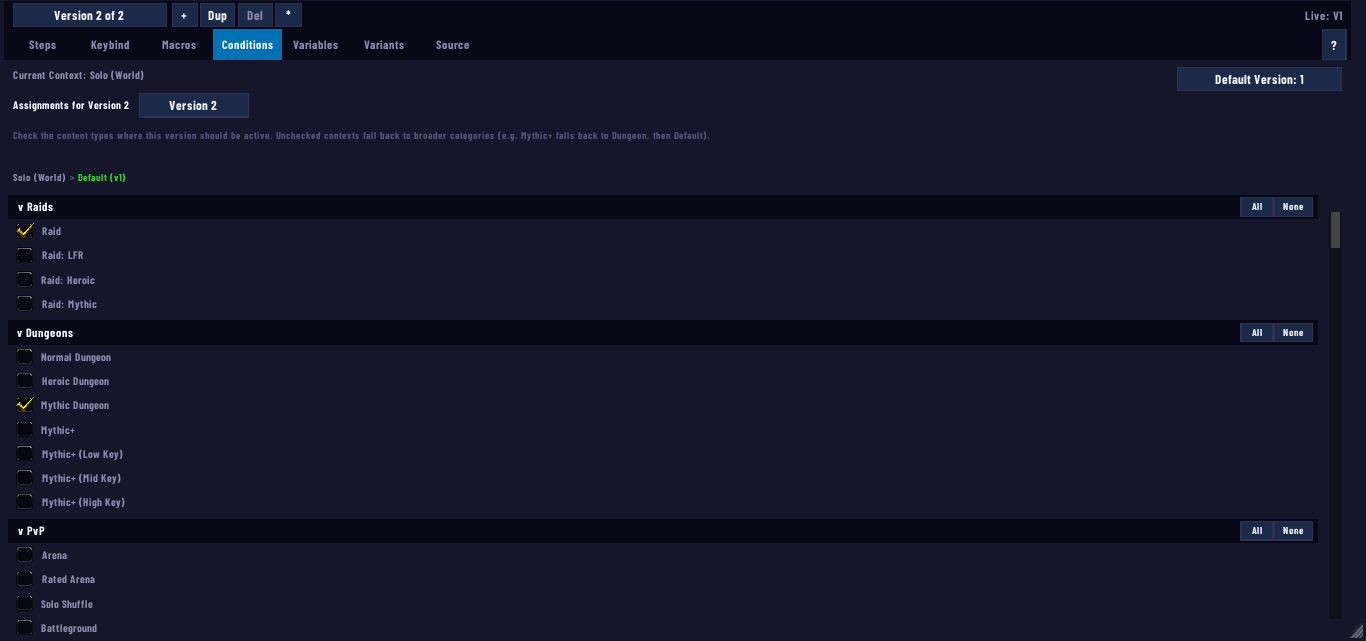
The Conditions tab, which only shows content once a sequence has a second version — add one from the small + next to "Version N of N" to unlock it.
This used to have a real failure mode. Swapping versions by zoning into a dungeon or arena could drop a sequence's loop and branch grouping, and it would stay broken until you ran a manual /reload. That is fixed. The self-heal that rebuilds loop and branch structure now runs on the context switch itself, not just on a reload, so grouping survives the swap the moment it happens.
If you want to override the automatic pick, you can pin a specific version as the live one regardless of what your current content or talents would otherwise select. The pin holds until you clear it, and the version list shows a badge next to whichever version is actually firing. Useful if you are deliberately running an off-spec version of a sequence, or testing a version before letting it take over automatically for its intended content. While a version is pinned this way, the Conditions tab names it in a line under its hint and says your ticks apply once it is unpinned.
There is a second, separate way to make one key do different things depending on your setup, and it solves a different problem than context versions do. Per-loadout keybinds, found in Settings under General, lets a single keybind attach to whichever talent loadout was active when you set it, off by default and per character. Turn it on and any bind you make from then on belongs to that loadout specifically; binds you made before stay in place as the fallback for any loadout that does not have its own. The slash form is /gems bind <sequence> <key> --loadout <name or id>.
The distinction that matters: context versions switch on where you are, zone, difficulty, key range, and so on. Per-loadout keybinds switch on which talent build you currently have equipped, regardless of zone. If your split is by content, a pet version for open world against a no-pet version for Mythic+, context versions is the tool, one sequence with two versions and the right context boxes ticked on each. If your split is by loadout instead, two full builds you swap between with the in-game loadout picker, per-loadout keybinds is the one that actually tracks it, since context versions has nothing loadout-aware in the picker today. If you use both loadouts in the same content, context cannot tell them apart and per-loadout keybinds is the only route that works.
Keybind recovery
GRIP-EMS includes automatic keybind monitoring. If your sequence keybinds go missing after a login, a loadout swap, or a deleted loadout eating its own binds, the addon detects it and tells you. Running /gems binds restore puts your last working set back immediately.
The addon snapshots your binds on every clean load, so recovery is reliable even across sessions. If you see a warning about missing binds, run the restore command before assuming something is broken in your sequence.
/gems binds restore first. It takes two seconds and covers the most common cause of unexplained dead keys.Per-step Disable and the sequence tracker
Individual steps can be disabled inside the editor without deleting them. A disabled step is skipped entirely by the engine, which means you can comment out a step for testing purposes without losing the macro text. Re-enable it and the engine picks it up again on the next keypress.
Disabled sequences are hidden from the tracker overlay and from your action bar. A sequence that is toggled off does not occupy a visible tracker slot, which keeps the display clean when you have multiple sequences loaded but only some of them active.
Viewing sequences from other characters
GRIP-EMS sequences are stored per character. That is not a setting anyone picked, it is how WoW loads addon saved data: only the file belonging to the character you are currently logged in as gets loaded, so an alt's sequences are not hidden, they are not in memory at all while you are playing a different character. A brand new character showing an empty sequence list, with the search box finding nothing, is that working as intended rather than a bug.
There is a way to see across characters without switching. The sequence list carries an Other characters tick box right under Current class only, off by default. Turn it on and you get a read-only view of every other character's sequences, names, icons, and step counts, once each character has logged in at least once on a build that has this feature; each character publishes its own list on login, so a fresh alt only appears in that list after you have logged into it once. You cannot fire another character's sequence from that view, but the copy to character option on any sequence stages it to actually land on that character the next time you log into it there.
Interleave / Weave
Interleave lets you set an interval on any action so it fires every N steps automatically, without you having to manually place it throughout your sequence. Set an action's interval to 5, for example, and the compiler weaves that action into your rotation every fifth step, on top of whatever else is already there.
This is the right tool for maintenance buffs, trinket procs, or cooldowns you want firing on a regular cadence without disrupting your main rotation flow. Rather than manually inserting the same spell at steps 5, 10, 15, and 20, you set one interleave interval and the compiler places it for you at every one of those points, correctly, even if you later add or remove steps elsewhere in the sequence.
The real interval range is 1 to 50 steps. An interval of 1 weaves a copy in after every base step; 2, which is also the value a new interleave starts at when you first add one, is the most common source of people thinking 2 is the floor. It is only the default, not the minimum.
Interleave does not require a Loop block. It works fine sitting at the top level of a sequence, and it works inside a Loop too, but the interval counts against a different population of steps depending on where it lives. At the top level it spaces against every compiled base step in the whole sequence. Inside a Loop, it spaces against that loop's own steps after its Repeat count has been unrolled, and only that loop's steps. The same interval number produces different real-world spacing depending on which of those two scopes it is sitting in, which is worth checking if an interleaved action seems to fire more or less often than you expected.
There is a hard budget of 200 interleave copies across a sequence. Past that, later interleaves quietly get fewer copies inserted than you asked for rather than erroring, and it is easy to hit once a Repeat count on a loop duplicates the underlying list. If an interleaved action seems to be firing less often than its interval implies on a sequence with several other interleaves already running, that budget is worth checking before anything else.
The editor marks any interleaved row with an [IL:N] indicator so you can see at a glance which steps are woven in versus part of your authored rotation.
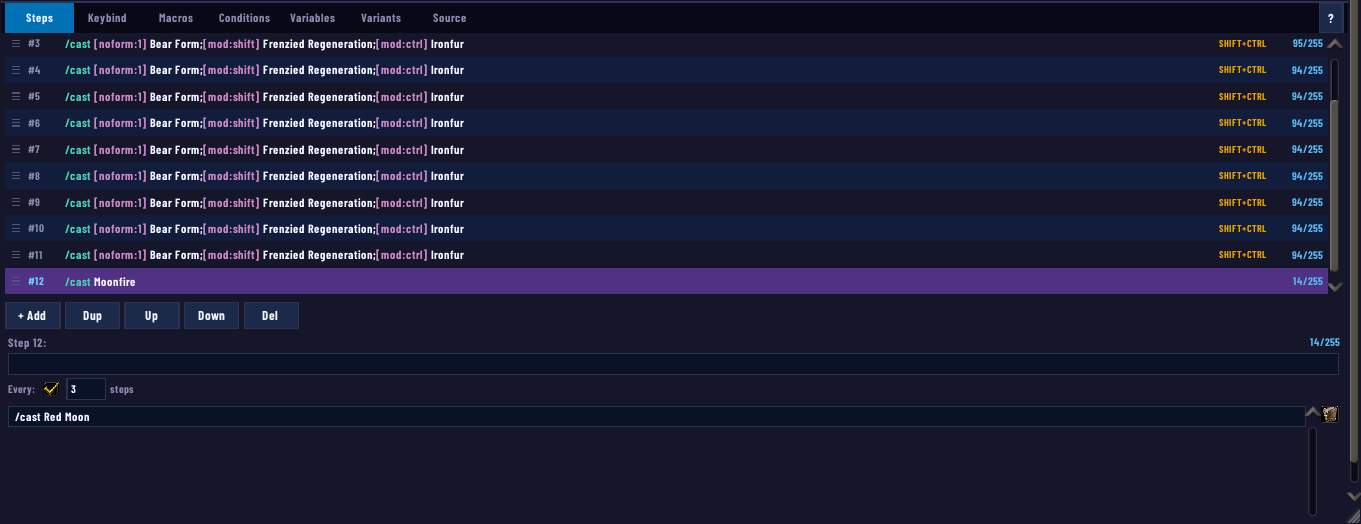
A real Interleave node — Red Moon set to Every: 3, woven into the loop without being manually placed at every third step.
Plugin support
GRIP-EMS exposes a public plugin API so other addons can extend it without touching its source. Everything goes through one frozen entry point, GRIPEMS.API, and it is owner-scoped and isolated per plugin, so a bug in someone else's plugin breaks their plugin, not your sequences. Anything a plugin adds is owned by its plugin id and reverts cleanly the moment that plugin is disabled, no leftovers in your settings or your sequences.
This is the kind of thing you will only ever notice if you run an addon that uses it. If a plugin adds a new export format, it shows up alongside the built-in one in the export window's format picker. If a plugin adds settings, they appear inside its own panel rather than scattered through GRIP-EMS's existing menus. None of this changes default behavior for anyone who is not running a plugin.
As of v2.3.0, the API extends to action bars specifically. A plugin can put one of your sequences directly on an action button, reading per-step spell data, creating and picking up that sequence's macro, and registering its own /gems subcommand to go with it. Same rule applies: nothing changes unless you are running a plugin.
If you build addons and want to extend GRIP-EMS yourself, the full API reference, including the security model and every method by access tier, lives at jesperlive.github.io/GRIP-EMS-PluginAPI. That documentation is the authoritative source for plugin development, this guide is written for sequence builders rather than addon authors, but the rest of this section covers enough to get a first plugin off the ground.
If you want to build something that ships your own sequences, or hooks into GRIP-EMS more deeply than a settings panel can, the plugin API is the place to start, and it is a smaller lift than it looks. The docs site has a Getting started page and a working example under examples/MyFirstPlugin in the repo, and the wiki carries additional detail. A plugin is just its own addon that declares GRIP-EMS as a dependency in its .toc (## Dependencies: GRIP-EMS makes WoW load EMS first and refuse to load you without it) and calls into GRIPEMS.API from PLAYER_LOGIN rather than at file scope.
Shipping a set of your own sequences is close to the smallest thing you can build with it. Check RequireVersion, then call API:RegisterSequences with a plugin name, a version string, an ordered list of sequence names, and a table keyed by those names. GRIP-EMS namespaces whatever you register under your plugin's own name, and a user's own sequence with the same name always wins on a clash, so a plugin cannot silently overwrite someone's personal work. Build each sequence inside GRIP-EMS itself and export it rather than hand typing the table, the exported shape is what RegisterSequences expects.
RegisterSequences covers shipping fixed sequences, but a plugin that builds sequences on the fly, generating a rotation from a log or a stat weight rather than shipping a hand-authored one, needs to know the action tree: the five node shapes GRIP-EMS actually compiles a sequence's steps from underneath the editor's UI.
{type="action", macro="/cast [combat] Kill Command", interval=N}. interval is optional, 1 to 50, and weaves a copy of that action in every N steps, the same mechanism the editor's Interleave setting drives.{type="loop", children={...}, ["repeat"]=N, stepFunction="Sequential"}. Lets a Sequential opener and a Priority body live in one sequence.{type="if", variable="[combat]", children={{true branch}, {false branch}}}. variable compiles down to [cond] on the resulting macro line, it is not a live runtime check.{type="pause", clicks=N}. Anything below 1 clamps up to 1, there is no zero-click pause.{type="embed", sequence="Name"}. It reads that target sequence's already-compiled steps directly.A few of these are worth building defensively around rather than finding out about them from a bug report. An if node with an empty or unparseable conditional compiles to nothing, silently, no error shown to the user. Semicolon fallback syntax inside the conditional box is rejected outright, so validate whatever gets typed in there before it saves. A condition also only gets injected into commands the macro engine actually recognizes as conditional-capable; anything outside that set passes the line through unchanged and the condition is quietly dropped. An embed pointing at a sequence name that does not exist compiles to nothing just as silently, and since it reads the target's already-compiled steps rather than compiling them itself, embedding a sequence that has never actually been activated in EMS can also come back empty. Nesting is capped at 10 levels deep, on top of the 1 to 50 caps already mentioned on loop and pause.
One field on a version is easy to get backwards: repeatCount. A value of nil, 0, or 1 all mean no wrap at all, the sequence just cycles the normal way. Only 2 or higher does anything, and what it does is wrap the entire compiled action list in a synthetic Sequential loop and inline that many copies at compile time, capped at 50. The part that actually catches people: the version's own step function applies at runtime, over the already-duplicated list, not over your original one. repeatCount 3 combined with Priority runs the Priority expansion over the tripled list, so a 10-action sequence can balloon to 465 compiled slots rather than the number you would expect from Priority alone. Leave repeatCount at 0 unless the step function is Sequential.
Two read calls are worth knowing if your plugin needs to inspect a sequence rather than just register one. API:GetAuthoredSteps(name) hands back the steps in the order you actually wrote them, loops unrolled and branches flattened, with no interleave copies. API:GetSequenceSteps(name) hands back the real execution order after the step function has expanded it, Priority triangle and all. Comparing the two lengths is a fast way to see whether a step function expansion or an interleave setting produced the count you expected. GetAuthoredSteps is newer than the current API version number suggests, so feature-detect it with if API.GetAuthoredSteps then rather than gating on RequireVersion alone.
The API keeps its own changelog, separate from the main GRIP-EMS changelog, tracking only what moved on the plugin surface itself. Worth a bookmark if you are maintaining a plugin, since a release can add a capability without bumping the API version number when the addition is purely additive, which means a presence check is sometimes the only reliable way to detect something new.
Importing sequences and macro name collisions
Every sequence import can carry a named WoW macro alongside it, the way the MOONSPAM pattern on the Building sequences page depends on. As of v2.4.3, GRIP-EMS checks whether it created a macro before it touches it during an import. If an incoming macro shares a name with one already in your /macro list that GRIP-EMS did not create itself, your macro is left alone and you get a chat line naming which one was skipped, rather than having its body silently replaced.
Before v2.4.3, a name clash on the macro side was not handled the way sequence name clashes already were, and an import could overwrite a same-named macro you wrote yourself with no prompt and no undo. If you hit a skipped macro on import, rename either the incoming macro or your existing one and import again; the sequence itself still imports normally, only the colliding macro is held back.
The import also has to make the macro in the first place, and that part was broken in v2.4.20. According to the v2.4.21 changelog, v2.4.20 read an import string's sequences and variables and ignored the macros it carried, so a sequence that depended on one, MOONSPAM being the obvious case, arrived without it. As of v2.4.21 the import window lists each macro the string carries, and the window, /gems import and a friend's auto-accepted send all make it, account-wide or for your character as the export says. A macro of your own with the same name is still left alone, the import window offers to rename the imported one, and the chat report now says how many macros it made and how many it left alone. On v2.4.20, build the macro yourself from the post before you press the sequence.
The visual display layer versus what actually executes
This is worth knowing because it causes real confusion in the Discord regularly. GRIP-EMS has two separate things: the visual preview of your sequence in the editor, and the compiled macro output that actually runs when you press your keybind. They are not the same thing.
The visual layer renders steps it can match against known spells in its database. Steps it cannot match, including certain raw macro lines, some conditional constructs, and hero talent override spells under specific conditions, do not show in the preview. But they still exist in the compiled output and WoW's macro engine executes them correctly. A step that is invisible in the editor is not a broken step.
This passthrough behavior is intentional and is how GRIP-EMS supports custom macro syntax that the addon's parser does not explicitly recognize. If you see fewer steps in the preview than you built and your sequence is otherwise working, this is almost certainly why.
What gets written to disk when you save is a related but separate question from what gets displayed, and it has its own history worth knowing. Through v2.4.8, a step could get its stored spell swapped out from under you by whatever the game was calling that spell at the exact moment you hit save, rather than the spell you actually own. Blood DK running San'layn was the worst case of it, Heart Strike silently stored as Vampiric Strike while the buff happened to be up, and Ravage on Druid of the Claw had the same problem. Fixed in v2.4.9: EMS now stores the spell you actually own on both save and load, and any step that got corrupted this way before the fix corrects itself automatically on your next login. A second, differently-shaped version of the same category of bug affected talent-driven overrides specifically, where editing one version of a sequence could re-derive and overwrite the spell names stored in sibling versions you had not touched. v2.4.13 closed one of the three mechanisms behind that; v2.4.14 closed the remaining two. If you are on anything earlier than v2.4.14, treat any override or proc-swapped spell in a saved sequence as worth a manual check after an update, rather than assuming it survived untouched.
Sharing sequences and authorship
As of v2.4.8, GRIP-EMS actively protects authorship on anything you did not write yourself. Send a sequence to someone, answer a request for one, or run /gems export on it, and if you are not the original author, EMS names who is and waits for you to confirm before it goes out. That check follows the content itself rather than a copy count, so a copy of a copy still traces back to whoever actually wrote it. Your own work is completely unaffected by this, no prompt on anything you wrote, however many times you send it or however many copies exist.
Two related fixes landed in the same release. Marking a sequence do-not-share used to fall off quietly the moment you duplicated it, saved it, renamed it, or retyped its Source tab contents, and every sharing route would then treat the copy as shareable even though the original was not. The mark now survives all of that, and every sharing route refuses the copy exactly like it refuses the original. Separately, opening someone else's sequence and hitting Save, or duplicating one, used to silently re-stamp it with your name as the author. Both of those are gone; what EMS asks about now follows the actual content, not whichever account most recently touched the save button.