Installation
Step 1: Download and enable
Download from CurseForge, Wago, or WoWInterface
GRIP-EMS is free on all three platforms. Use whichever addon manager you already have.
Enable the addon in-game
At the character select screen, click AddOns in the bottom left corner and make sure GRIP-EMS is checked. Log into your character.
If you do not see GRIP-EMS in the list, your addon manager did not install it correctly. Try a manual download and drop the folder into your World of Warcraft\_retail_\Interface\AddOns directory.
Step 2: The settings you should still check
As of GRIP-EMS v2.3.14, the addon forces Key Down Casting on automatically every time you log in, so that part of setup is no longer something you need to touch. Two things still matter for sequences to feel right, and neither is set to an ideal value by default.
Key Down Casting is handled for you now
GRIP-EMS fires through WoW's key-down event system. By default WoW uses key-up, which means a sequence would register the press only when you release the key rather than when you press it. At 150ms intervals that is the difference between a functioning rotation and nothing happening at all.
Starting in v2.3.14, GRIP-EMS sets ActionButtonUseKeyDown to enabled itself on every login, whether or not you have ever opened the settings. It is no longer a row in the CVar Health tab and there is nothing to fix here manually.
/gems settings, go to the CVar Health tab, and click Fix if the row is not green. That is the single most common reason a pre-2.3.14 install does nothing on keypress.Verify your SpellQueueWindow
The SpellQueueWindow controls how many milliseconds before a GCD ends WoW will accept your next cast input. The CVar Health tab shows your current value and flags it if it looks off. The default of 400ms is fine to leave alone for now. The full explanation of what SQW does, why it matters, and how to tune it for your connection is on the Settings page.
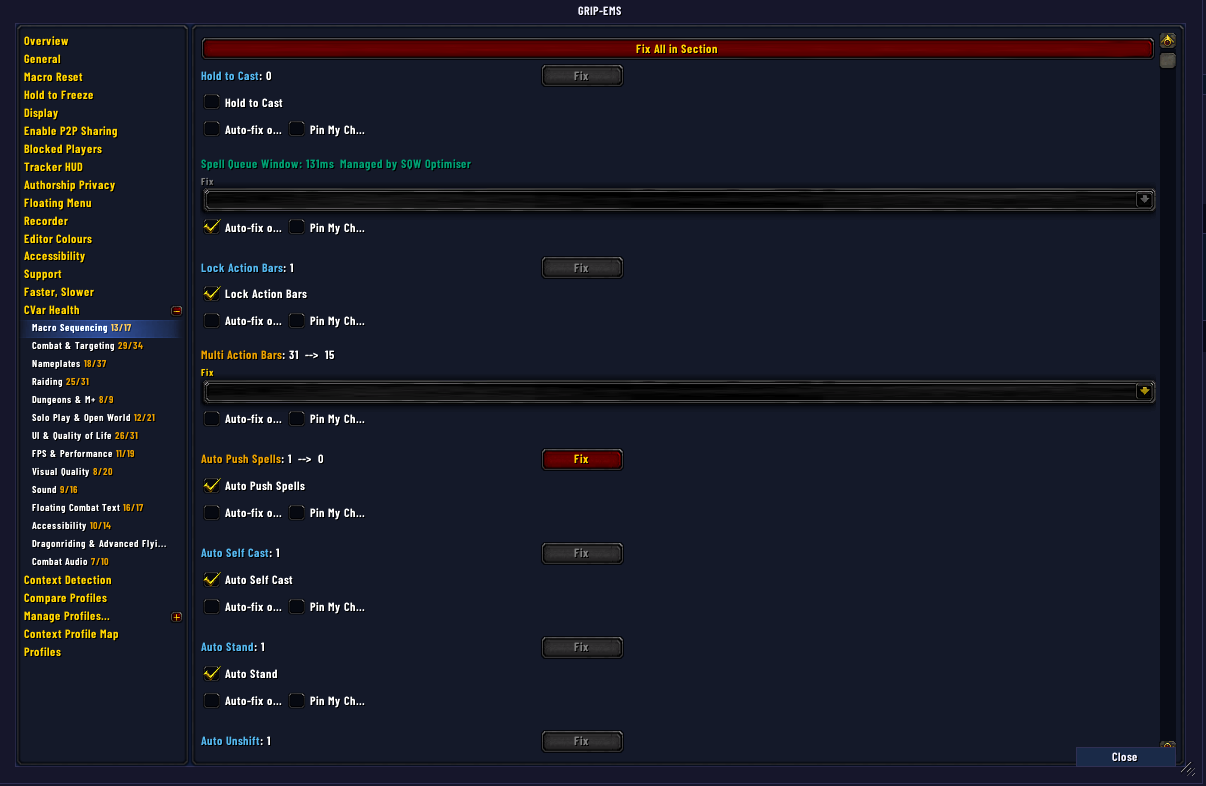
CVar Health, open on the Macro Sequencing row group. Green means correctly set; a Fix button appears next to anything that isn't.
Set your click rate
GRIP-EMS advances one step per keypress. Your hardware or software needs to send repeated keypresses at a consistent interval. The right value depends on your setup but 150ms is a reliable starting point that works across most hardware and latency combinations. If you are using Razer hardware, set your repeat rate to 150ms in Synapse.
Once you have a sequence running and some combat data logged, the Tempo Advisor on the Settings page shows a recommended click rate worked out from your sequence's actual step timing and how you play it. That number is more accurate than any static figure and gets sharper the more you play that sequence.
What you will not see and why
GRIP-EMS does not work like the legacy program, which creates a draggable button you place on a bar and bind. GRIP-EMS binds a key directly to a sequence inside the addon. For sequences with multiple versions, a macro is created and can be placed on your action bar, but for single-version sequences there is nothing to drag. If you are looking for a button to appear and it is not appearing, that is expected behavior and not a bug.
To bind a key to a sequence, open the sequence in the GRIP-EMS editor, go to the Keybinds tab, and assign a key there. The bind is stored per-spec, so switching specs gives you a clean slate for a different rotation on the same key.
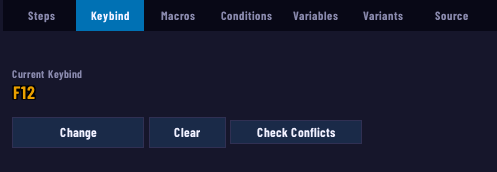
The Keybinds tab with a key already bound. This is the only place a sequence gets its key — there is no separate WoW keybind menu entry to hunt for.
If you specifically want a button on your action bar that you can drag and drop the way you would with the legacy program, that workflow still exists as an optional add-on rather than a built-in GRIP-EMS feature. Daxomault's GRIP-EMS Actionbutton Override plugin adds action bar override and drag-and-drop keybinding on top of GRIP-EMS. It is not required and the keybind-only approach above is still the default and the one most players end up using, but it is there if you prefer to keep sequences on your bars.
Quick sanity check
Before moving on, confirm these four things are true:
Troubleshooting common problems
Keybind is set but nothing fires
First, update GRIP-EMS through your addon manager. As of v2.3.14, Key Down Casting is forced on automatically and this is no longer something you can misconfigure. If you are still on an older version, run /gems settings, go to the Cvar Health tab, and click Fix if the row is not green; this solves the majority of pre-2.3.14 keybind problems. On 2.3.14 or later, if the sequence still does not fire, check that you have a target selected and that the sequence has a keybind assigned in the Keybinds tab inside the editor, not just in WoW's default keybind menu. Run /gems keys to check whether another addon or click binding is quietly eating the key before GRIP-EMS ever sees it.
Key still shows correctly in /gems but pressing it does nothing after a loading screen
This was a known bug through v2.4.0: GRIP-EMS re-applies sequence keybinds at runtime rather than parking them in WoW's own binding list, so a loading screen could silently drop the live binding while /gems still listed it as bound. Fixed in v2.4.1. Update GRIP-EMS through your addon manager. If you are already current and still see this, it is not the same bug; run /gems keys to check for a genuine conflict instead.
I put a sequence's macro on my action bar and pressing it does nothing
Multi-version sequences generate a macro you can place on a bar, but clicking that macro with your mouse or pressing it from an action bar slot is not the same as a Keybinds-tab bind, and it will not fire the sequence correctly on its own. GRIP-EMS is built around binding a key directly to the sequence inside the editor's Keybinds tab, not around action bar buttons. If you want the drag-and-drop, click-to-fire workflow you may be used to from the legacy program, install Daxomault's GRIP-EMS Actionbutton Override addon, which adds that behavior back as an option.
Sequence fires once then stops
GRIP-EMS requires continuous repeated keypresses, not a single press and hold. Your hardware or software needs to be configured to send repeated keypress events. At 150ms that is roughly 6 to 7 presses per second. A single press fires one step and stops.
Sequence shows greyed out after a /reload in arena or M+
This was a known bug where the addon waited on a match flag that never cleared mid-fight, leaving sequences inactive until the match ended. Update GRIP-EMS through your addon manager. Clicking a greyed-out sequence row in the editor also re-activates it on the spot.
Sequence key stops working randomly while grinding, mount and dismount fixes it
This was a bug where the addon waited on a match-privacy flag that never cleared outside of arena or Mythic+ specifically, which could leave a sequence marked dormant longer than it should have been in some overland situations. Update GRIP-EMS through your addon manager. Clicking the greyed-out sequence row in the editor re-activates it immediately without needing to relog.
Sequence key dies after skyriding or leaving a vehicle
The keybind suspend-and-restore runs inside the secure engine and survives skyriding, vehicle exits, and possession. If you are hitting this, update GRIP-EMS through your addon manager. You can also press your sequence key while skyriding over an attackable target and it will dismount and fire step 1 in a single press.
Sequence key fires mid-air or vehicle keys are dead on first flight of the session
This was a real first-takeoff bug: ground binds could stay live mid-air, or vehicle keys never woke up at all, on the first flight of a session specifically. It is fixed. An out-of-combat watchdog now heals the swap the moment you take off and restores it on landing, so the first flight of a session behaves the same as every other one. If you are current and still hitting this, it is not the same bug; report it in the Discord with your GRIP-EMS version and whether it happens on every login or only occasionally.
Another addon keeps stealing my sequence keybinds
Some addons override-bind the same keys GRIP-EMS uses, and whoever loads last wins. Run /gems keys, or click Check Conflicts on the Keybind tab, and GRIP-EMS checks every key your sequences use, including vehicle and pet battle slots, against your saved bindings and names the addon behind a conflicting binding where it can. It clears two known kinds of conflict for you directly; Undo backs out the last change if something else grabs the key again afterward. GRIP-EMS does not fight for the bind otherwise, it just tells you who took it.
Sequence says a spell cannot be found, but it works fine once I am in the right form or proc
This is expected behavior, not a bug. GRIP-EMS checks whether a spell is castable right now before it will queue it in a step. Some spells only exist, or only become the correct version, in a specific state, such as Void Volley replacing Void Bolt only while a Shadow Priest is in Voidform, or a spec-specific proc swapping what a button actually casts. Outside that state the addon correctly reports it cannot find the spell, then the step behaves normally the moment you are actually in the state where the spell exists. If the step is working in practice once the condition is met, there is nothing to fix. If you want the warning to stop appearing while testing outside the triggering state, an addon like ErrorMonster can redirect the message so it does not clutter your chat window.
Commands worth knowing
/gemsOpens the GRIP-EMS sequence editor/gems settingsOpens settings including Cvar Health/gems bindsShows all currently bound sequences for your active spec/gems keysChecks every sequence, vehicle, and pet battle key against your saved bindings and names conflicts/gems debug onEnables debug output to chat, useful when something is not firing/gems debugwindowOpens the debug window with additional diagnostic information/gems validateRuns spell validation across all your sequences and reports stale spells/gems revalidateForces a full revalidation, useful after a patch or respec